


Fearless Deployments. Faster Fixes.
Frictionless error monitoring and performance insights for your entire app stack.
Know about errors before your users even notice. Installs in minutes.

4.7 Rating


Trusted by 1600+ organizations:


Why Airbrake?

Developer Centric
From testing to production, Airbrake Error Monitoring has your back:


Immediate Value
It’s simple to get up and running with Airbrake Error Monitoring and Performance Monitoring:

Lightweight
Gain visibility into the health of your entire app stack with agentless and serverless architecture:
Installs in Minutes in any Language

JavaScript
Include the library via a script tag:
<script src="https://cdn.jsdelivr.
net/npm/@airbrake/browser"></script>
Initialize the library with your account credentials:
const airbrake = new Notifier({ projectId: 123,
projectKey:'abcdefgh12345678'});

Python
Install our library:
pip install -U pybrake
Import the package and initialize with your account credentials:
import pybrake
notifier = pybrake.Notifier(project_id=123, project_key='abcdefgh12345678')

Ruby
Add our gem to your project:
gem install airbrake-ruby
Initialize the library with your account credentials:
require 'airbrake-ruby'
Airbrake.configure do |c| c.project_id = <Your project ID>
c.project_key = '<Your project API KEY>'
end













After signing up just add your product key and that's it...
More Languages

Never miss an error with Airbrake
Airbrake Error Monitoring and Performance Monitoring catches all your project errors, intelligently groups them and points you to the issue in the code so you can quickly fix the bug before customers are impacted. Hotspots and insights flag high risk files and errors.
Learn more“Airbrake probably has cut our error response times in half because it is much simpler to isolate and identify issues and root causes.”
Mike Biang, VP of Operations

Simple performance metrics that developers care about
Airbrake Error Monitoring and Performance Monitoring’s lightweight APM enables developers to track the performance and availability of their application through metrics like HTTP requests, response times, error occurrences, and user satisfaction.
Learn more“Airbrake is a rough measure of quality and a part of our continuous improvement process.”
Tom Tuddenham, Senior Software Engineer

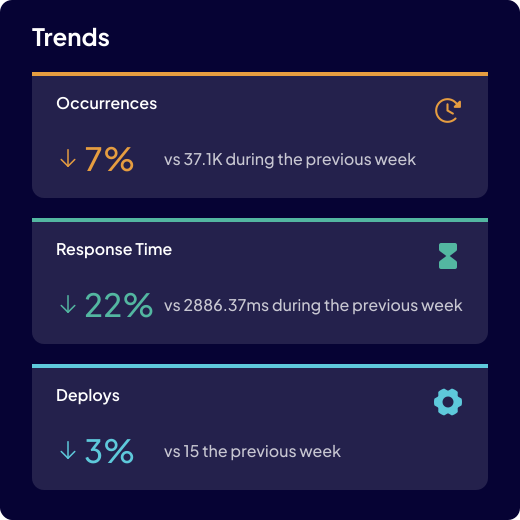
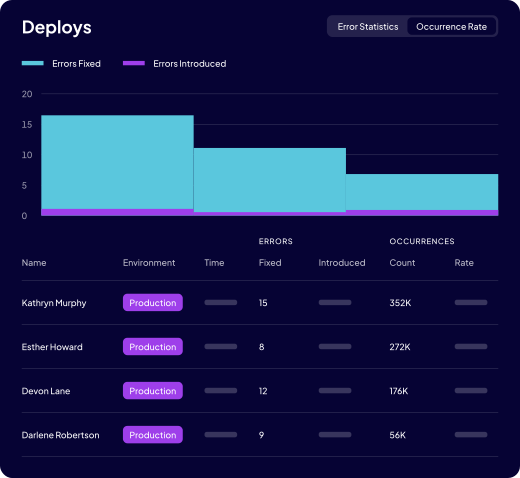
Correlate errors with Deployments
Track trends, fix bad deploys, and improve code quality with Airbrake Error Monitoring and Deployment Tracking.
Learn more“Sometimes we forget to test a specific case but we can always count on Airbrake to let us know and get some tests written to cover those.”
Chris Oliver, Lead Engineer



Integrate with your favorite tools
Airbrake’s seamless integrations ensure you receive real-time notifications in your preferred collaboration tool, messaging app or e-mail inbox, so you can stay on top of bugs (and bugs stay off your back).
Learn moreDevelopers Love Airbrake









_HighestUserAdoption_Adoption.png)
_HighestUserAdoption_Adoption.png)
Deploy Fearlessly with Airbrake
Start Free Trial




Airbrake - A LogicMonitor Company - © 2024 - All Rights Reserved